

Để hướng dẫn bạn có thể tạo danh mục sản phẩm trong wordpress, chúng ta sẽ tiếp tục series hướng dẫn các bạn tùy biến Flatsome một cách đẹp nhất mà không cần biết code. Nghe có vẻ đơn giản nhưng bạn cần phải biết sơ về code tí mới làm được nhé!
Mục lục bài viết:
Làm đẹp danh mục sản phẩm flatsome trong wordpress đơn giản
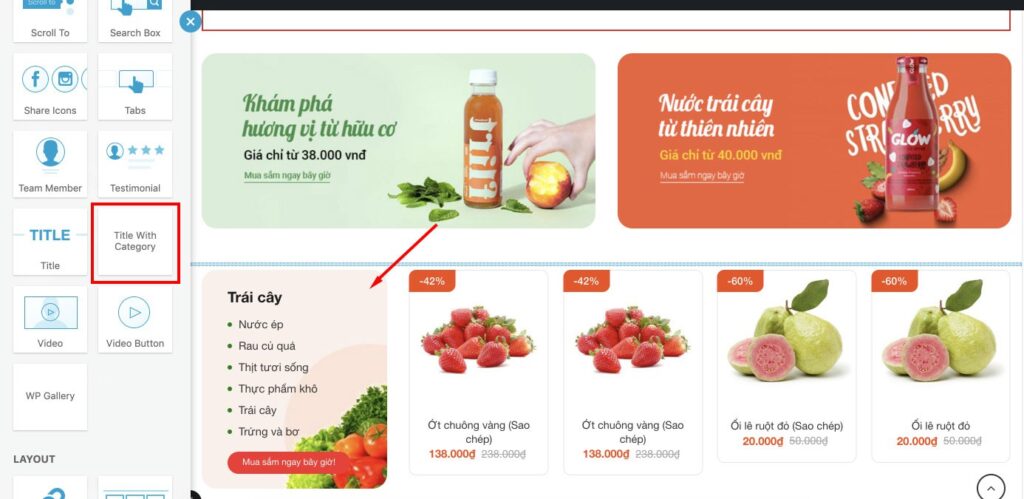
Thêm vào file functions.php
Hàm dưới đây giúp bạn tạo Element cho flatsome dùng để kéo thả ở bất kì vị trí của page nào mà bạn muốn hiện thị. Chèn code vào file functions.php
function ttit_add_element_ux_builder(){
add_ux_builder_shortcode('title_with_cat', array(
'name' => __('Title With Category'),
'category' => __('Content'),
'info' => '{{ text }}',
'wrap' => false,
'options' => array(
'ttit_cat_ids' => array(
'type' => 'select',
'heading' => 'Categories',
'param_name' => 'ids',
'config' => array(
'multiple' => true,
'placeholder' => 'Select...',
'termSelect' => array(
'post_type' => 'product_cat',
'taxonomies' => 'product_cat'
)
)
),
'img' => array(
'type' => 'image',
'heading' => 'Image',
'default' => '',
),
'icon_color' => array(
'type' => 'colorpicker',
'heading' => __( 'Icon Color' ),
'description' => __( 'Only works for simple SVG icons' ),
'format' => 'rgb',
'position' => 'bottom right',
'on_change' => array(
'selector' => '.icon-inner',
'style' => 'color: {{ value }}',
),
),
'style' => array(
'type' => 'select',
'heading' => 'Style',
'default' => 'normal',
'options' => array(
'normal' => 'Normal',
'center' => 'Center',
'bold' => 'Left Bold',
'bold-center' => 'Center Bold',
),
),
'text' => array(
'type' => 'textfield',
'heading' => 'Title',
'default' => 'Lorem ipsum dolor sit amet...',
'auto_focus' => true,
),
'tag_name' => array(
'type' => 'select',
'heading' => 'Tag',
'default' => 'h3',
'options' => array(
'h1' => 'H1',
'h2' => 'H2',
'h3' => 'H3',
'h4' => 'H4',
),
),
'color' => array(
'type' => 'colorpicker',
'heading' => __( 'Color' ),
'alpha' => true,
'format' => 'rgb',
'position' => 'bottom right',
),
'width' => array(
'type' => 'scrubfield',
'heading' => __( 'Width' ),
'default' => '',
'min' => 0,
'max' => 1200,
'step' => 5,
),
'margin_top' => array(
'type' => 'scrubfield',
'heading' => __( 'Margin Top' ),
'default' => '',
'placeholder' => __( '0px' ),
'min' => - 100,
'max' => 300,
'step' => 1,
),
'margin_bottom' => array(
'type' => 'scrubfield',
'heading' => __( 'Margin Bottom' ),
'default' => '',
'placeholder' => __( '0px' ),
'min' => - 100,
'max' => 300,
'step' => 1,
),
'size' => array(
'type' => 'slider',
'heading' => __( 'Size' ),
'default' => 100,
'unit' => '%',
'min' => 20,
'max' => 300,
'step' => 1,
),
'link_text' => array(
'type' => 'textfield',
'heading' => 'Link Text',
'default' => '',
),
'link' => array(
'type' => 'textfield',
'heading' => 'Link',
'default' => '',
),
),
));
}
add_action('ux_builder_setup', 'ttit_add_element_ux_builder');
function title_with_cat_shortcode( $atts, $content = null ){
extract( shortcode_atts( array(
'_id' => 'title-'.rand(),
'class' => '',
'visibility' => '',
'img' => '',
'icon_color' => '',
'inline_svg' => 'true',
'text' => 'Lorem ipsum dolor sit amet...',
'tag_name' => 'div',
'sub_text' => '',
'style' => 'normal',
'size' => '100',
'link' => '',
'link_text' => '',
'target' => '',
'margin_top' => '',
'margin_bottom' => '',
'letter_case' => '',
'color' => '',
'width' => '',
'icon' => '',
), $atts ) );
$classes = array('container', 'section-title-container');
if ( $class ) $classes[] = $class;
if ( $visibility ) $classes[] = $visibility;
$classes = implode(' ', $classes);
$link_output = '';
if($link) $link_output = '<a href="'.$link.'" target="'.$target.'">'.$link_text .'</a>';
$small_text = '';
if($sub_text) $small_text = '<small class="sub-title">'.$atts['sub_text'].'</small>';
if($icon) $icon = get_flatsome_icon($icon);
// fix old
if($style == 'bold_center') $style = 'bold-center';
$css_args = array(
array( 'attribute' => 'margin-top', 'value' => $margin_top),
array( 'attribute' => 'margin-bottom', 'value' => $margin_bottom),
);
if($width) {
$css_args[] = array( 'attribute' => 'max-width', 'value' => $width);
}
$css_args_title = array();
if($size !== '100'){
$css_args_title[] = array( 'attribute' => 'font-size', 'value' => $size, 'unit' => '%');
}
if($color){
$css_args_title[] = array( 'attribute' => 'color', 'value' => $color);
}
if ( isset( $atts[ 'ttit_cat_ids' ] ) ) {
$ids = explode( ',', $atts[ 'ttit_cat_ids' ] );
$ids = array_map( 'trim', $ids );
$parent = '';
$orderby = 'include';
} else {
$ids = array();
}
if ( $img && ! is_numeric( $img ) ) {
$org_img = $img;
} elseif ( $img ) {
$img_src = wp_get_attachment_image_src( $img, $image_size );
if ( $img_src ) {
$org_img = $img_src[0];
$org_height = $img_src[2];
// Check if width and height is set, because svg images has no size.
if ( $img_src[1] > 0 && $img_src[2] > 0 ) {
$width = $img_src[1];
$width = ( intval( $height ) / intval( $org_height ) ) * intval( $width ) + ( intval( $padding ) * 2 ) . 'px';
} else {
$width = 'auto';
}
}
}
$css_args = array(
'icon_border' => array(
'attribute' => 'border-width',
'unit' => 'px',
'value' => $icon_border,
),
'icon_color' => array(
'attribute' => 'color',
'value' => $icon_color,
),
);

$args = array(
'taxonomy' => 'product_cat',
'include' => $ids,
'pad_counts' => true,
'child_of' => 0,
);
$product_categories = get_terms( $args );
$hdevvn_html_show_cat = '';
if ( $product_categories ) {
foreach ( $product_categories as $category ) {
$term_link = get_term_link( $category );
$thumbnail_id = get_woocommerce_term_meta( $category->term_id, 'thumbnail_id', true );
if ( $thumbnail_id ) {
$image = wp_get_attachment_image_src( $thumbnail_id, $thumbnail_size);
$image = $image[0];
} else {
$image = wc_placeholder_img_src();
}
$hdevvn_html_show_cat .= '<li class="camap_cats"><a href="'.$term_link.'">'.$category->name.'</a></li>';
}
}
return '<div class="'.$classes.'" '.get_shortcode_inline_css($css_args).'><'. $tag_name . ' class="camap-title-cat" style="background-image:url('.$org_img.')"><h3 class="section-title-main" '.get_shortcode_inline_css($css_args_title).'> '.$icon.$text.$small_text.' </h3>
<div class="camap-show-cats">'.$hdevvn_html_show_cat.'</div>'.$link_output.'</' . $tag_name .'></div><!-- .section-title -->';
}
add_shortcode('title_with_cat', 'title_with_cat_shortcode');
Thêm vào file css
Bạn có thể thêm bằng ftp hoặc ở Dashboard chọn Giao diện -> Sửa giao diện -> Chọn style.css hoặc Tùy biến/Css bổ sung và dán code này vào
.camap-title-cat {
background-repeat: no-repeat;
background-position: center;
height: 100%;
border-radius: 20px;
padding: 20px 35px;
background-size: cover;
}
.camap-show-cats li {
font-size: 15px;
margin-bottom: 5px;
list-style: none;
position: relative;
padding-left: 15px;
}
.camap-show-cats li:before {
content: '';
position: absolute;
left: 0;
width: 6px;
height: 6px;
background-color: green;
border-radius: 99px;
top: 0;
bottom: 0;
margin: auto;
}
.camap-title-cat > a {
background-color: #f62e2e;
border-radius: 30px;
color: #fff;
font-size: 12px;
height: 30px;
display: inline-flex;
align-items: center;
padding: 0 20px;
margin-top: 10px;
}
Test Vào giao diện UX Builder
Chúc các bạn thành công


Bình luận bị cấm: Bình luận có chứa yếu tố SPAM và yếu tố quảng cáo.